
Training and onboarding videos for small teams: make them from a prompt
· 4 min read · The Explainly team
Most small teams have the same problem: the process lives in one person's head. A new hire asks how refunds work, how to close the till, or how to log a support ticket, and someone repeats the same five-minute explanation for the tenth time. A written checklist helps, but people skim it. A short narrated video that draws the steps as they are explained is easier to follow and easy to replay.
The catch has always been time. Recording a screen, writing a script and animating it can take longer than the explanation you were trying to save. This guide shows how to get a first draft of a training video from a text prompt with Explainly, the tool we build, and where you still need a human.
Example: a 1-minute refund procedure
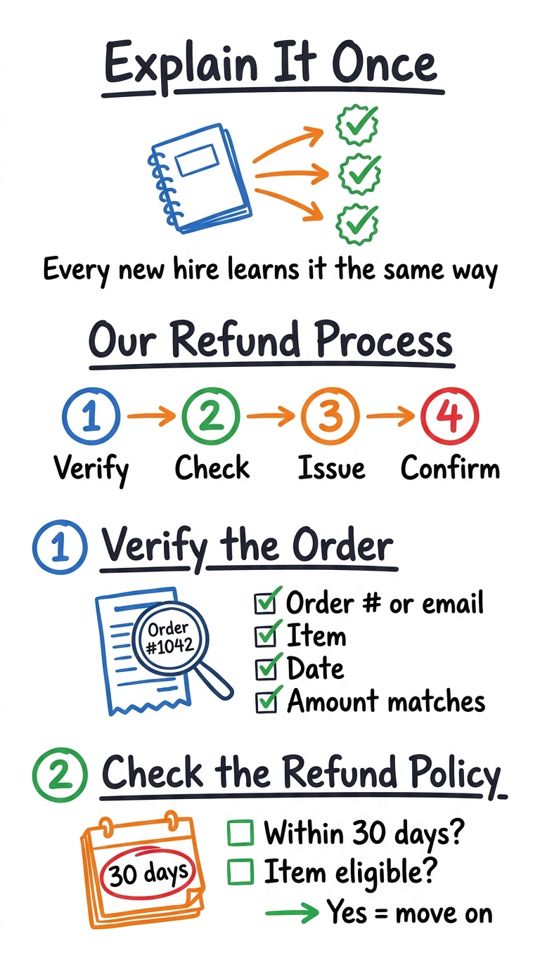
The video below was made from a short prompt describing a four-step refund procedure (verify the order, check the policy, issue the refund, confirm with the customer). The 30-day policy and the $25 amount are placeholders, labelled as examples in the video description. Replace them with your own rules.
What works well as a training video
- Step-by-step procedures: refunds, opening and closing routines, onboarding a new client, using an internal tool.
- "Why we do it this way" explanations: safety rules, data-handling rules, brand voice basics.
- Day-one orientation: who does what, where things live, who to ask.
- Refreshers: a 60-second reminder of a rule people tend to forget.
It is a weaker fit for anything that needs a screen recording of your exact software, or footage of a physical task. Whiteboard drawings explain concepts and sequences; they don't replace a hands-on demo.
Five prompt templates
Fill the brackets, then paste into the prompt box. Put anything that must be exactly right (amounts, deadlines, names of roles) into the prompt itself instead of hoping the script guesses it.
- Procedure: "Explain how to [task] in [4] steps for a new [role]. Step 1: [..]. Step 2: [..]. Step 3: [..]. Step 4: [..]. Friendly, plain language, no jargon. End with one sentence on what to do if something goes wrong."
- Policy with a reason: "Explain our [policy] to new staff. State the rule: [rule]. Give the reason: [reason]. Give one realistic example and one common mistake."
- Orientation: "A 2-minute welcome for new [role]s at a [type of business]. Cover: how a normal day runs, who to ask for [A], [B] and [C], and the three things we care about most: [..]."
- Checklist refresher: "A 60-second reminder of the [N]-point [closing] checklist. Name each point in order and say why it matters in one short phrase."
- Customer-facing how-to: "Show customers how to [do X] in [3] steps. Reassuring tone. End by telling them where to get help: [channel]."
Format and length
- Length: one procedure per video. About 1 minute for a single task, 2 to 4 minutes for a policy with examples. If a topic needs more, split it into several short videos people can find by name.
- Orientation: 16:9 for a shared drive or a wiki; 9:16 if people will watch on their phones, for example shop-floor or field staff.
- Language: you can pick the narration and script language (English, Romanian, Spanish, French, German, Italian, Portuguese, Dutch, Polish, Russian or Hindi), which helps with mixed-language teams. Have a fluent colleague check a translated procedure before you rely on it.
What it costs
Whiteboard videos are $0.49 per minute at 720p and $0.69 per minute at 1080p, with no subscription: you top up a balance ($10, $25 or $50 packs) and pay for what you make. Ten 2-minute procedures at 720p come to about $9.80. Your first 1-minute video is free with no card (free spots are limited each day), failed generations are refunded, and if a video comes out shorter than requested the unused minutes go back to your balance. See pricing.
Review checklist before you share it
- Watch it once with the sound on. Does every step match how you really do it?
- Check numbers and names. Amounts, time limits, role titles and tools.
- Check what is missing. Exceptions, escalation, who to contact.
- Keep sensitive data out of the prompt. No customer details, passwords or internal secrets.
- Treat compliance topics with care. For safety, legal or regulated training, use the video as a supplement and have a qualified person approve the content.
Start with one process
Pick the explanation you give most often, write it as four steps, and make a 1-minute version first. If your team finds it useful, make the next one.