
Whiteboard videos for teachers: turn a lesson into a narrated video from a prompt
· 3 min read · The Explainly team
Most teachers already explain the same topics every year: photosynthesis, fractions, the causes of a war, how a bill becomes law. A short whiteboard video of that explanation is useful far beyond the lesson itself. Students who were absent can catch up, students who didn't get it the first time can rewatch it, and you can open the next lesson with a two-minute recap instead of repeating yourself.
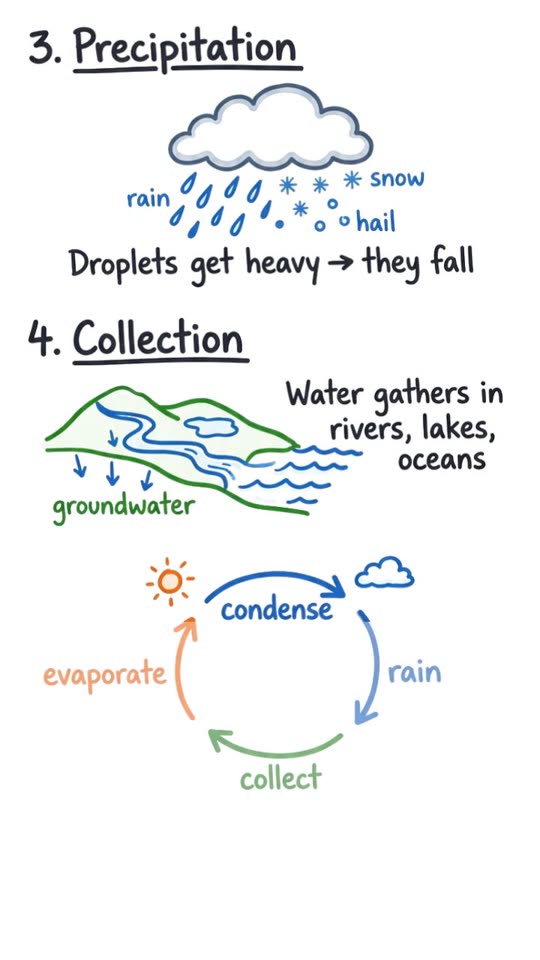
The problem is time. Drawing, recording and editing a good explainer by hand takes hours. This guide shows a faster route: write what you want explained, and let Explainly write the script, draw the board and narrate it. Here is an example made from one two-sentence prompt asking for the water cycle in 60 seconds for a 10-year-old:
Where short lesson videos help most
- Flipped classroom: students watch the explanation at home, and class time goes to practice and questions.
- Absent students and catch-up: a link in your class page or LMS instead of a re-teach.
- Revision before tests: one short video per key concept, rewatchable on a phone.
- Hooks and recaps: a 1-minute video to open a topic or close a lesson.
- Mixed-language classes: the same lesson narrated in another language (Explainly supports English, Romanian, Spanish, French, German, Italian, Portuguese, Dutch, Polish and Russian).
Prompts you can copy
Good prompts say who it's for, what must be covered and how it should end. A few templates to adapt:
- Concept in steps: "Explain [topic] for [grade] in [3/4/5] steps. Use one everyday analogy. End with a one-sentence summary."
- Myth buster: "Start with the common misconception that [myth]. Explain why it's wrong and what is actually true, for [grade]."
- Worked example: "Walk through solving [problem] step by step for [grade]. Show each step on the board. Finish by naming the method."
- Cause and effect: "Explain the causes of [event] for [grade]: [cause 1], [cause 2], [cause 3]. Show how they connect, then the main consequence."
- Recap with a question: "Recap [topic] in about one minute for [grade], then ask one quick question for the class and give its answer."
Paste your own notes under the prompt if you want the video to follow your lesson closely. The prompt box takes long text and basic formatting (headings, lists), so lesson notes work well.
Choosing the format
- 16:9 landscape for the projector, your LMS or YouTube. Use 9:16 vertical if students will mostly watch on phones.
- Length: about 1 minute for a hook or recap, 3 to 5 minutes for a single concept, up to 10 minutes or more for a full walkthrough. One idea per video works better than a whole unit squeezed into one.
- Style: Classic (white board) is the safest choice for most subjects; the Neon black board stands out for older students.
What it costs
Explainly is pay-as-you-go with no subscription, which suits a school budget or a teacher paying out of pocket:
- Whiteboard videos cost $0.49 per minute at 720p ($0.69 at 1080p). See pricing for the current rates.
- Example: ten 5-minute lesson videos at 720p are 50 minutes of video, about $24.50.
- New accounts get their first 1-minute video free, so you can test it on one topic first.
- Credit packs are $10, $25 or $50 and don't expire into a monthly fee.
A quick quality checklist before you share
AI-generated explanations are drafts, so treat them the way you'd treat a textbook you haven't used before:
- Watch it once, fully, and check every fact, number and label against what you teach.
- Put must-be-right facts in the prompt (definitions, dates, the exact formula you use). The script will follow them.
- Check the level: if the vocabulary is too hard or too easy, regenerate with a clearer grade or age in the prompt.
- Keep student data out of prompts. Describe the topic, never individual students.
- Pair it with a task: a question to answer, a diagram to label, or a quick quiz in your next lesson.
Start with one topic
Pick the topic you explain most often, write one prompt using a template above, and make a 1-minute version first. If it saves you one repeat explanation, it has paid for itself.