
How to make faceless YouTube Shorts with AI whiteboard videos
· 3 min read · The Explainly team
A faceless explainer channel needs three things for every video: a script worth watching, visuals that move, and a voice. Most creators either do all three by hand or stitch together several tools. This guide shows a simpler setup: one prompt per Short, and Explainly (the tool we build) writes the script, draws it on a whiteboard step by step, narrates it and gives you a vertical MP4.
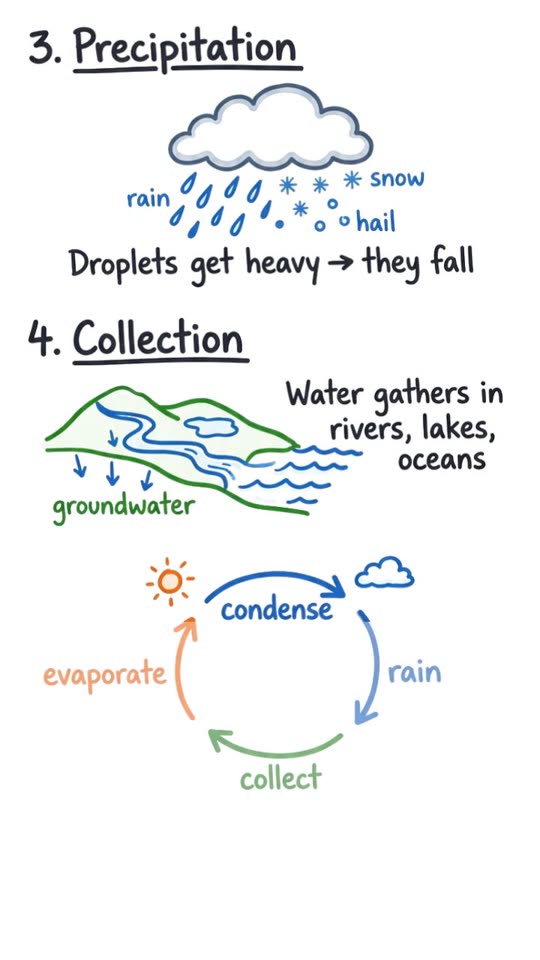
Here is an example. Everything in it, from the script to the drawings and the voice, came from one prompt:
Why whiteboard explainers suit faceless Shorts
- The drawing is the hook. Viewers stay to see what the next line becomes, which is exactly what a Short needs in its first seconds.
- No face, no filming. The board and the narration carry the video.
- They answer questions people search for. "How does X work" and "why does Y happen" topics keep getting found long after you post them.
Step 1: Pick a topic lane
Choose one lane so viewers know what they'll get by following you: science questions, money basics, psychology, history, tech explained simply, study tips. Then list 20 questions in that lane that a curious 12-year-old or a busy adult would ask. That's your first month.
Step 2: Write the prompt like a Short
The prompt decides the script, so build the Short into it:
- Hook: the question or surprising claim for the first line.
- Three points, in order.
- Who it's for, which sets the vocabulary.
- Length: about 60 seconds.
Example:
Hook: "Seasons are NOT caused by distance from the sun." Explain Earth's 23.4° axial tilt, why direct vs slanted sunlight matters, and why the hemispheres have opposite seasons. For curious teenagers. 60 seconds, punchy.
Put any fact that must be exact (a number, a date, a name) in the prompt itself.
Step 3: Generate it in 9:16
In Explainly, pick 9:16 format, ~1 min length, a voice and a language (10 of each). 720p is enough for Shorts; 1080p costs a little more. A one-minute video takes a few minutes to generate.
Shorts can now run up to three minutes (YouTube Help), but one minute is a good default for explainers: one idea, fully explained.
Step 4: Check it before you post
AI gets things wrong sometimes, and your channel's name is on the video. Watch the preview once and check:
- every number, date and name against a source you trust;
- that the drawings match what the narration says;
- that the first line is the hook you asked for.
If something's off, make the prompt more specific and generate it again.
Step 5: Download and upload
Click Render to MP4 and download it. Every video comes with a ready-made YouTube title, description and tags you can copy from the same page. When you upload:
- Turn on YouTube's altered or synthetic content disclosure if it applies; we tick it for all our AI-made Shorts to be safe.
- Add your own captions or music in an editor if your channel style uses them.
- Schedule a week at a time. Batch-make seven Shorts in one sitting and schedule one per day.
Step 6: Keep what works
After a week or two, look at YouTube Studio: which Shorts kept people watching past the first few seconds? Make more on those topics, and rework the hooks of the ones people swiped away from. YouTube's monetization rules don't reward mass-produced, repetitive videos, so make each Short a real, specific answer, not a template with the topic swapped out.
What it costs
Explainly is pay-as-you-go: whiteboard videos cost $0.49 per minute at 720p, so a one-minute Short is about $0.50, and a month of daily Shorts is about $15. Credit packs start at $10, there's no subscription, failed videos are refunded, and your first 1-minute video is free (limited spots each day).
You can also make Shorts without leaving your AI assistant: connect Explainly to ChatGPT or Claude and ask for "a 1-minute 9:16 video explaining…".